
Renault Koleos Owners Manual: Trip computer and warning system
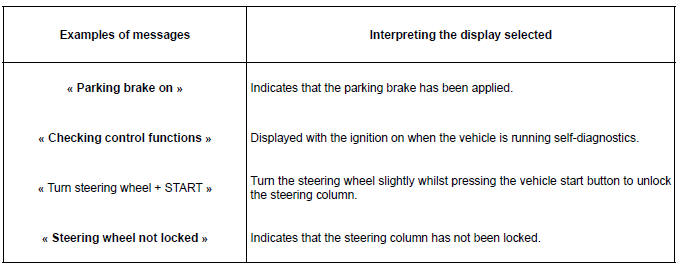
Information messages These can help in the vehicle starting phase, or give information about a selection or a driving status. Examples of information messages are given in the following pages.
Operating fault messages These appear with the
They disappear when the display selection key is pressed or after several
seconds and are stored in the computer log. The
Warning message These appear with the Some examples of warning messages are given below. Note: the messages appear on the display either individually or alternately (when there are several messages to be displayed), and may be accompanied by a warning light and/or a beep.
|
 warning
light and mean that you should drive very carefully to an authorised dealer as
soon as possible. If you fail to follow this recommendation, you risk damaging
your vehicle.
warning
light and mean that you should drive very carefully to an authorised dealer as
soon as possible. If you fail to follow this recommendation, you risk damaging
your vehicle.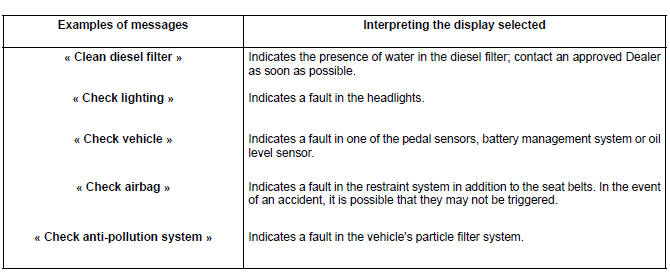
 warning
light and require you to stop immediately, for your own safety, as soon as
traffic
conditions allow. Stop your engine and do not restart it. Contact an approved
Dealer.
warning
light and require you to stop immediately, for your own safety, as soon as
traffic
conditions allow. Stop your engine and do not restart it. Contact an approved
Dealer.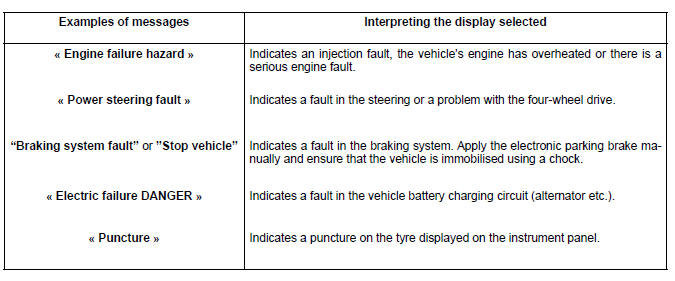


See More:
Renault Koleos Service Repair Manual > Heating: Heater matrix: Removal -
Refitting
RIGHT-HAND DRIVE REMOVAL I - REMOVAL PREPARATION OPERATION Disconnect the battery (see Battery : Removal - Refitting) (80A, Battery). Remove: the glovebox (see Glovebox: Removal - Refitting) ( 57A, Interior equipment), the left-hand cover on the centre panel (see Dashboard: Removal - Refitting) (57A ...
Renault Koleos Owners Manual
- Getting to know your vehicle
- Driving
- Your comfort
- Maintenance
- Practical advice
- Technical specifications
Renault Koleos Service Repair Manual
